Mostrando postagens com marcador Java. Mostrar todas as postagens

sexta-feira, 17 de janeiro de 2014

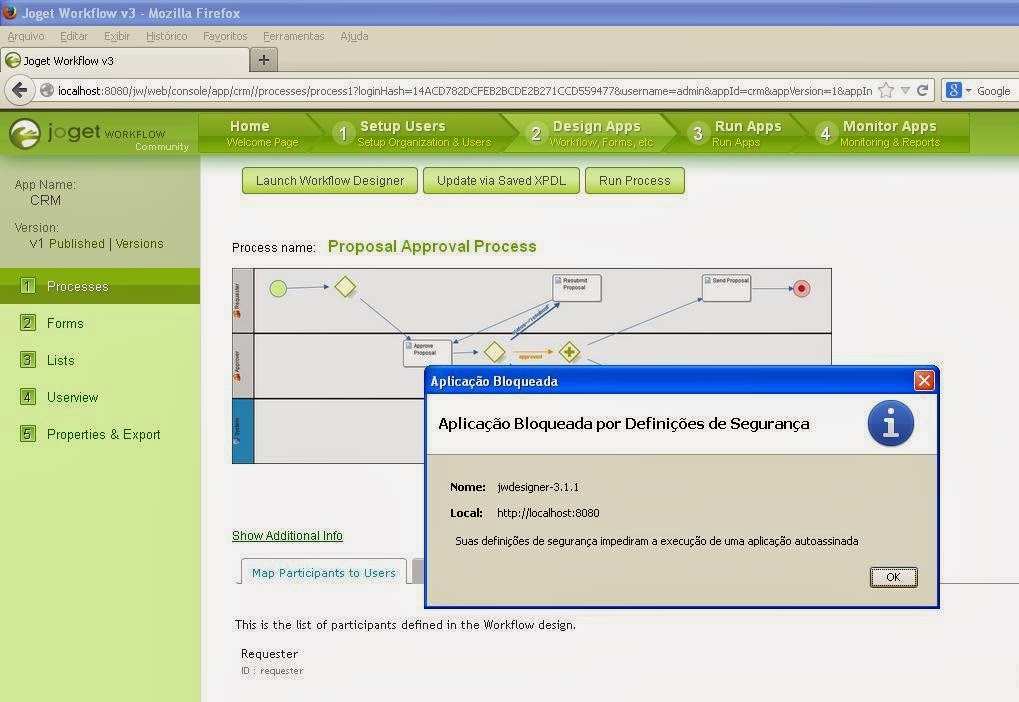
Aplicação Bloqueada por Definições de Segurança

Suas definições de segurança impediram a execução de uma aplicação autoassinada.

Depois de instalar o JAVA - VERSÃO 7, update 51, comecei a receber erros estranhos.
A mensagem dá a impressão que é algum problema de FIREWALL ou coisa parecida. Mas não é.
É o JAVA 7.

Para resolver.
Painel de Controle > Java > Segurança > Nível de Segurança -> Medio.

Que apurrinhação!!


Resolvido.


sexta-feira, 23 de agosto de 2013

Reading directories

import java.io.File;

public class DirList {
   public static void main(String args[]) {
      String dirname = "/tmp";
      File f1 = new File(dirname);
      if (f1.isDirectory()) {
         System.out.println( "Directory of " + dirname);
         String s[] = f1.list();
         for (int i=0; i < s.length; i++) {
            File f = new File(dirname + "/" + s[i]);
            if (f.isDirectory()) {
               System.out.println(s[i] + " is a directory");
            } else {
               System.out.println(s[i] + " is a file");
            }
         }
      } else {
         System.out.println(dirname + " is not a directory");
    }
  }
}

Read and Write file using Java

import java.io.*;

public class fileStreamTest{

   public static void main(String args[]){
  
   try{
      byte bWrite [] = {11,21,3,40,5};
      OutputStream os = new FileOutputStream("test.txt");
      for(int x=0; x < bWrite.length ; x++){
         os.write( bWrite[x] ); // writes the bytes
      }
      os.close();
    
      InputStream is = new FileInputStream("test.txt");
      int size = is.available();

      for(int i=0; i< size; i++){
         System.out.print((char)is.read() + "  ");
      }
      is.close();
   }catch(IOException e){
      System.out.print("Exception");
   }   
   }
}

quinta-feira, 22 de agosto de 2013

Could not find or load the default class

Hey!
How are you doing?
If you are like me, trying to remember how to configure youre machine to start programmin in JAVA, that's how your enviromental variables must look like bellow:
CLASSPATH = .;C:\Program Files\Java\jdk1.7.0_21\bin

JAVA_HOME=C:\Program Files\Java\jdk1.7.0_21

Path= %JAVA_HOME%\bin
Attention:
Avoid redundance of javas
For instance, my windows has JDK 1.7, JRE 1.6 and JRE 1.7.
If your machine was set for programming, use only jdk. Otherwise your gonna receive messages that are variations of that one
"Could not find or load the default class" - very irritating message.


And to be sure you are using the right version go DOS command line and type
java -version
The result in my case is
Java(TM) SE Runtime Environment (build 1.7.0_21-b11)
Java HotSpot(TM) Client VM (build 23.21-b01, mixed mode, sharing)
You must be absolutely right about the javac and java. Both must be from the same version or, when you try to run you .class file, you're gonna receive an error message.
And that's all folks!

segunda-feira, 22 de julho de 2013

SOAPUI - the jvm could not be started. the maximum heap size xmx might be too large or an antivirus or firewall tool could block the execution

This problems came from nowhere.

The SOAPUI began to fail.
First of all I tried to reinstall Java. I didn't work.
 So I reinstalled SOAPUI. That worked!!